











What are Chimera Coupons
We introduced our coupon system to have a nice and easy way to reward or gift our users. We have many different coupons that you could receive: licence discounts, licence extensions, free credits and free licences. Usually, coupons are given via campaigns or directly, by a support team member. So if you receive a coupon you will be notified by email or by our support.
Where and how to activate
You can find your coupon(s) on your Dashboard if you are logged in. And they also appear on the Shopping Cart page as a step before Checkout.
First, look for the coupon section on your Dashboard.
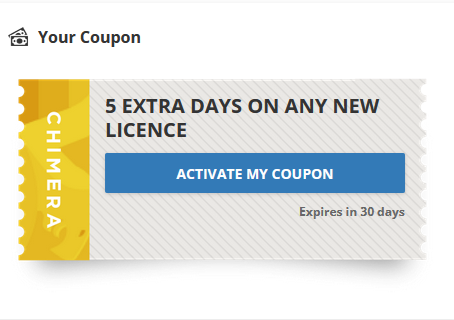
If you have only one licence then just continue by clicking the “ACTIVATE MY COUPON” button.
You will go to the Checkout page where you will see the coupon in your cart.
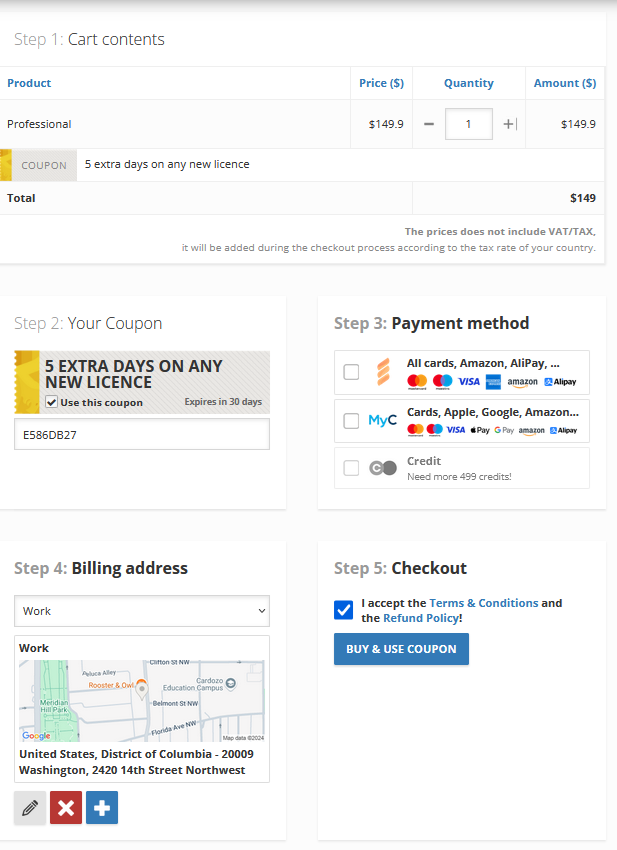
If you are starting this process from the Shopping Cart, then use the "Use this coupon" checkbox in Step 2 to apply the coupon for the selected item, respectively.
At last, choose your payment method in Step 3 and add your billing address in step 4 accept our Terms & Conditions and Refund Policy under Step 5.
Please note, if you are just activating a gift or licence extend coupon, the button at Step 5 will be "USE COUPON" and you will not pay anything.
Discount coupons will apply the offered discount and the Checkout button will be "BUY & USE COUPON".
FAQ
Check Frequently Asked Questions about ChimeraTool features!
Video Guide
Watch our YouTube video tutorials about ChimeraTool features!
Martview forum
Martview is not our official forum but it can bring help to all our customers, since the questions asked are answered by professionally relevant users and administrators there.
Test Points Library
A continuously updated collection of Test Point photos, PCB Diagrams and Blueprints to help everyone easily find the test point pins on smartphone motherboards - all at one place!
GSMHosting forum
This is our official English-language forum. We recommend it for all of our users, because many problems and errors have been described and answered here over the years.
 Popular Helps
 Popular Tags
