









Samsung Exynos devices: Change CSC - Country Specific Code
Some devices are released with country- or carrier-specific contents installed on them. This means, there may be custom boot logo, startup sound, customized settings, configurations, localization, geo-specific data.
This document created at Jul 31, 2023, 8:55:30 AM and modified at Nov 10, 2026, 5:50:51 AM.
 Back

You can use Chimera Tool to change the so-called CSC - Country Specific Code - based settings. Don't worry, your user data will not be affected.
To do this, you need to put the device in EUB mode by shorting the test point pins on the device. If you don't know how to put your phone into EUB mode, visit our Test Point collection here: https://chimeratool.com.cn/test-points. Once done, Chimera will recognize the device and the next steps will run in Exynos mode.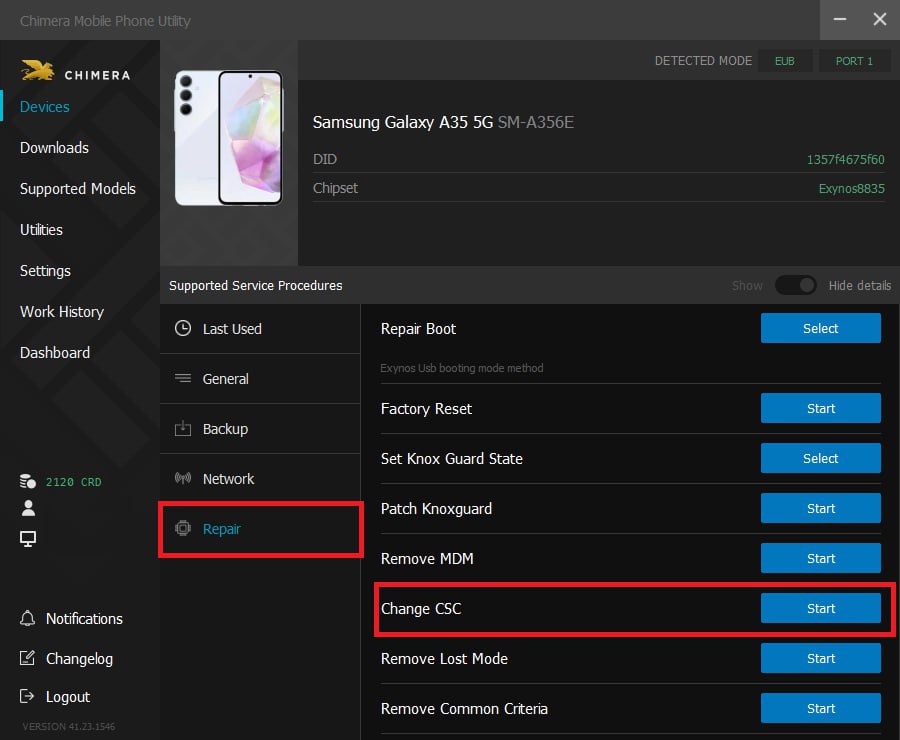
Then, click CSC Change on the General tab, and select the desired CSC from the list. Once done, click on Start to launch the procedure. Chimera Tool will start the operation and once it finishes successfully the CSC on your device will be changed.
Keywords: CSC, country specific code, carrier specific code
FAQ
Check Frequently Asked Questions about ChimeraTool features!
Video Guide
Watch our YouTube video tutorials about ChimeraTool features!
Martview forum
Martview is not our official forum but it can bring help to all our customers, since the questions asked are answered by professionally relevant users and administrators there.
Test Points Library
A continuously updated collection of Test Point photos, PCB Diagrams and Blueprints to help everyone easily find the test point pins on smartphone motherboards - all at one place!
GSMHosting forum
This is our official English-language forum. We recommend it for all of our users, because many problems and errors have been described and answered here over the years.
 Popular Helps
 Popular Tags
