










It is important to know that after each PC attachment you perform, there will be a fixed 48-hour waiting period. After the 48-hour period has elapsed, you can freely move your purchased license to another PC.
Lending or leasing your purchased license to another user is strictly prohibited; this will result in the disabling of the user’s account.
How to “detach” your registered PC from your license:
- Log in to the chimeratool.com.cn webpage with your username and password
- DASHBOARD menu item
- Licenses sub-menu
- You can find five little buttons next to the name of the registered PC (if gray, it is inactive). Click on the second button which is the “detach” button
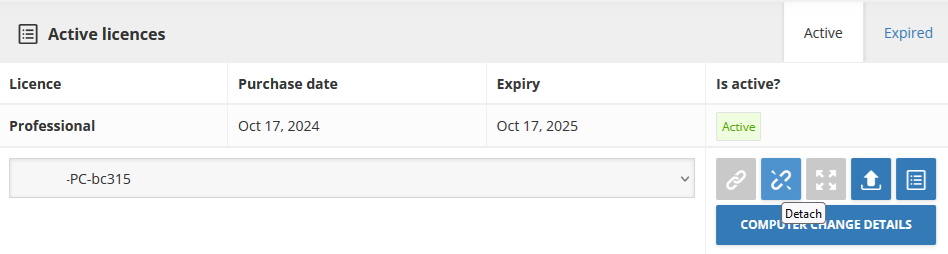
- Now you can freely attach a new PC to your license. If you have used that PC before, it is possible to select it from the drop-down menu. When it is a new computer, just log into the Chimera tool software and the PC will be attached automatically after the first procedure.
FAQ
Check Frequently Asked Questions about ChimeraTool features!
Video Guide
Watch our YouTube video tutorials about ChimeraTool features!
Martview forum
Martview is not our official forum but it can bring help to all our customers, since the questions asked are answered by professionally relevant users and administrators there.
Test Points Library
A continuously updated collection of Test Point photos, PCB Diagrams and Blueprints to help everyone easily find the test point pins on smartphone motherboards - all at one place!
GSMHosting forum
This is our official English-language forum. We recommend it for all of our users, because many problems and errors have been described and answered here over the years.
 Popular Helps
 Popular Tags
